Friday, December 31, 2010

Wednesday, December 29, 2010
Split Horizon, Routing update, Distance Vector, Poison Route, Periodic Update, Routing Table, metric, passive interface, auto summary
Split Horizon:
Split horizon is a method of preventing a routing loop in a network. The basic principle is simple: Information about the routing for a particular packet is never sent back in the direction from which it was received.Routing Update:
Distance Vector:
Distance Vector means that Routers are advertised as vector of distance and direction. 'Direction' is represented by next hop address and exit interface, whereas 'Distance' uses metrics such as hop count.
Routers using distance vector protocol do not have knowledge of the entire path to a destination. Instead Distance Vector uses two methods:
- Direction in which or interface to which a packet should be forwarded.
- Distance from its destination.
Poison Route:
A route listed in a routing update that the routing protocol purposefully assigns a metric value considered to be infinite, meaning that the route has failed.Periodic Update:
A routing protocol behavior in which the routing protocol sends Update messages on a regular interval (the period).Routing Table:
A list kept by routers that lists the best IP routes known to the router. Each entry lists a subnet or network, the associated mask, possibly the outgoing interface and/or IP address of the next-hop router, and other related info.Metric :
A numeric value that a routing protocol uses to imply how good a particular route is, so that when a router learns more than 1 route for the same network/subnet, the router can choose the best route as the route with the lowest metric.Passive Interface:
An interface local to a router, for which the routing protocol does not send routing protocol messages out to that interface. Different routing protocol has different view about Passive interface , in RIP when passive interface command applied in a interface , router will not send any update through that interface however will receive update . in EIGRP if passive interface command applied router will not form any adjacency , because the command will not allow EIGRP hello .Auto Summary:
If auto summary is enabled , router will automatically summary all routes in their class full boundaries .let say you have used a class B ip address 172.16.0.0/16 and subnet ed into many network ( 172.16.1.0/24 , 172.16.2.0/24 ) , however if auto summary is enable in your configuration , you will see only one summary route (172.16.0.0/16) in your routing table .
Tuesday, December 28, 2010
Whats in your mind ? Plan ==> Do ==> Check ==> Act .
hey, wanted to take somebody out :) or do something for your self , fit into Formula .

Saturday, December 25, 2010
Friday, December 24, 2010
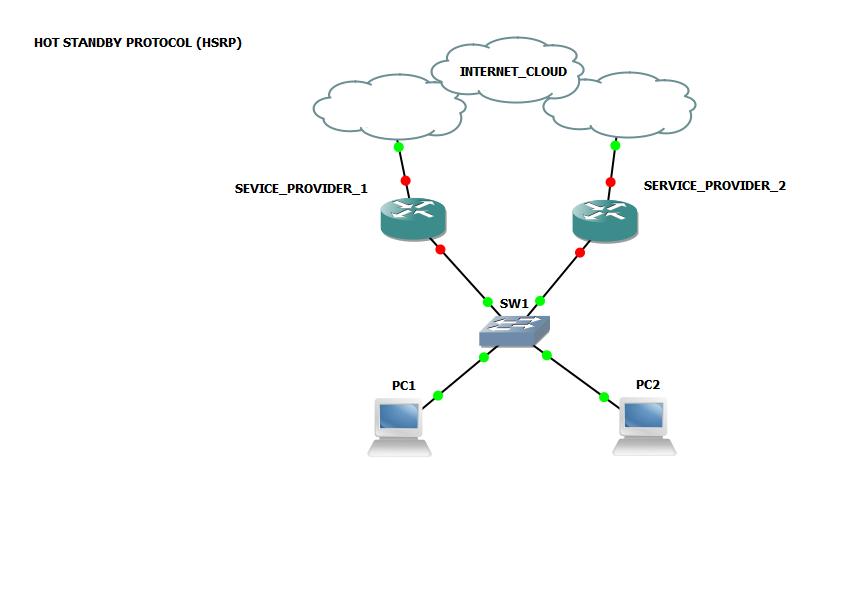
Concise notes Load Balancing HSRP, VRRP, GLBP
Hot Standby Router Protocol (HSRP) : Download this
provides network redundancy for IP networks, ensuring that user traffic immediately and transparently recovers from first hop failures in network edge devices or access circuits .HSRP allows multiple routers to share a virtual IP and MAC address so that the end-user hosts do not realize when a failure occurs.
Some of the key HSRP features are as follows:
■ Virtual IP address and virtual MAC active on the Master routerf
■ Standby routers listen for Hellos from the Active router, defaulting to a 3-second hello interval and 10-second dead interval
■ Highest priority ( default is 100, range 1–255) determines the Active router, with preemption disabled by default
■ Supports tracking, whereby a router’s priority is decreased when a tracked object (interface or route) fails
■ Up to 255 HSRP groups per interface,
■ Virtual MAC of 0000.0C07.ACxx, where xx is the hex HSRP group
■ Virtual IP address must be in the same subnet as the routers’ interfaces on the same LAN
■ Virtual IP address must be different from any of routers’ individual interface IP addresses
■ Supports clear-text and MD5 authentication (through a key chain)
HSRP, VRRP, and GLBP, can track interface states.can track based on the line protocol or the IP routing table.
Because HSRP uses only one Active router at a time, any other HSRP routers are idle. To provide load sharing in an HSRP configuration, the concept of Multiple HSRP, or MHSRP, was developed.In MHSRP, two or more HSRP groups are configured on each HSRP LAN interface, where the configured priority determines which router will be active for each HSRP group.
MHSRP requires that each DHCP client and statically configured host is issued a default gateway corresponding to one of the HSRP groups and requires that they’re distributed appropriately. Thus, in an MHSRP configuration with two routers and two groups, all other things being equal, half of the hosts should have one HSRP group address as its default gateway, and the other half of the hosts should use the other HSRP group address.
HSRP is Cisco proprietary,
Virtual Router Redundancy Protocol (VRRP) :
VRRP (RFC 3768) provides a standardized protocol to perform almost the exact same function. VRRP implementation has the same goals in mind as HSRP but with these differences:
■ VRRP uses a multicast virtual MAC address (0000.5E00.01xx, where xx is the hex VRRP group number).
■ VRRP uses the IOS object tracking feature, rather than its own internal tracking mechanism, to track interface states for failover purposes.
■ VRRP defaults to use pre-emption, but HSRP defaults to not use pre-emption. Both can be configured to either use pre-emption or not.
■ The VRRP term Master means the same thing as the HSRP term Active.
■ In VRRP, the VRRP group IP address is the interface IP address of one of the VRRP routers.
Gateway load balancing Protocol (GLBP) :
is a newer Cisco-proprietary tool that adds load-balancing features in addition to gateway redundancy features. Hosts still point to a default gateway IP address, but GLBP causes different hosts to send their traffic to one of up to four routers in a GLBP group. To do so, the GLBP Active Virtual Gateway (AVG) assigns each router in the group a unique virtual MAC address, following the format 0007.B400.xxyy, where xx is the GLBP group number, and yy is a different number for each router (01, 02, 03, or 04). When a client ARPs for the (virtual) IP address of its default gateway, the GLBP AVG replies with one of the four possible virtual MACs. By replying to ARP requests with different virtual MACs, the hosts in that subnet will in effect balance the traffic across the routers, rather than send all traffic to the one active router.Cisco IOS devices with GLBP support permit configuring up to 1024 GLBP groups per physical interface and up to four hosts per GLBP group.
Tuesday, December 21, 2010
How to configure Cisco ROUTER as DHCP server
WHAT is a DHCP server :
In a network, a DHCP server manages a pool of IP addresses, as well as default gateway details, DNS details and other information for the clients’ network configuration. When a new computer is introduced into a DHCP server-enabled network, it will send a query to the DHCP server requesting all the necessary information. When the query reaches the DHCP server, it will grant the new computer a new IP address and a lease - a time frame for which the computer can use this IP address, as well as other configuration details. The whole process takes place immediately after the new computer boots, and to be successful, it has to be completed before initiating IP based communication with other hosts in the network.
Subscribe to:
Posts (Atom)